Application for Mail Delivery Through Agent
Authorize a virtual mailbox or mail center to receive your mail. Answer a few questions in ChatGPT or Claude and get the official PS 1583, filled in and ready to sign.
- For
- Anyone opening a virtual mailbox or private mailbox at a CMRA, for personal or business use
- Time
- About 10 minutes
- Price
- $4.90, one-time · Government fees not included
You review the filled PDF before you pay. Then you sign it and file it yourself.
4.8 · 437 reviews for this formUpdated November 28, 2026 · Latest edition
 Official PDF · latest edition
What you'll need
- 1Your mailbox provider’s address and your PMB number
- 2A current government photo ID, such as a driver’s license or passport
- 3A second ID that proves your home address, such as a lease or vehicle registration
- 4For business use, your business name, address and place of registration
- 5A way to sign in front of the provider or a U.S. notary, in person or by live video
The guide
PS Form 1583, explained
Key points
- You need two current IDs: a government photo ID and a document proving your home address.
- A driver’s license can count as one of the two IDs, not both.
- Sign in front of the mailbox provider or a notary commissioned in the U.S., in person or by live audio and video.
- Each adult using a residential mailbox needs their own form.
What is PS Form 1583?
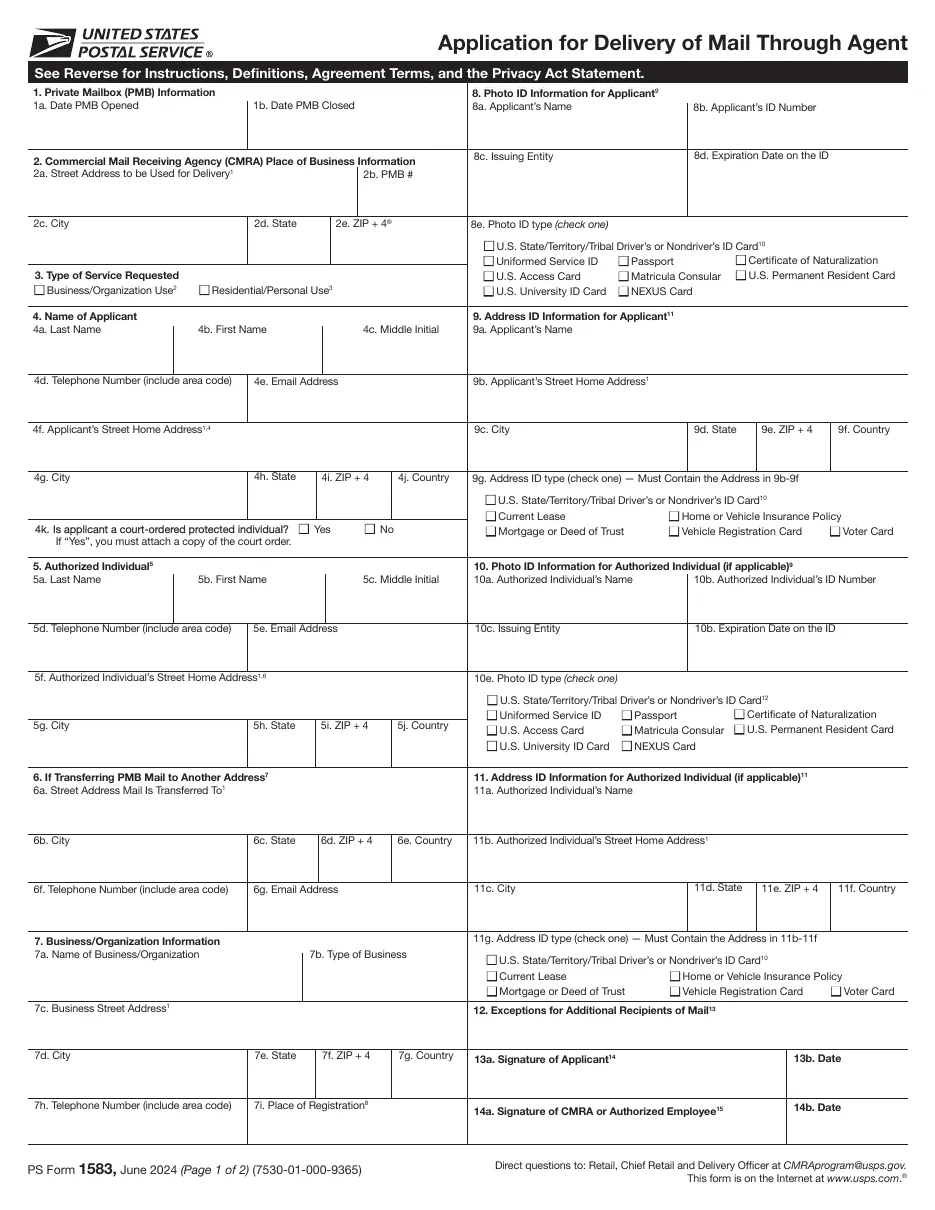
PS Form 1583 authorizes a commercial mail receiving agency (CMRA), such as a virtual mailbox or private mailbox store, to receive your mail. You complete it with two IDs and give it to that mailbox provider, which registers it with USPS.
Its official name is “Application for Delivery of Mail Through Agent”. You give it to your mailbox provider, which registers it with USPS.
Who files it
Anyone opening a virtual mailbox or private mailbox at a CMRA, for personal or business use.
What you need before you start
- Your mailbox provider’s address and your PMB number
- A current government photo ID, such as a driver’s license or passport
- A second ID that proves your home address, such as a lease or vehicle registration
- For business use, your business name, address and place of registration
- A way to sign in front of the provider or a U.S. notary, in person or by live video
Skip the instructions.
Answer a few questions in ChatGPT or Claude. We fill every box of your PS 1583.
How to fill out PS Form 1583, section by section
- Items 1-3Mailbox and type of serviceThe provider fills its address and your PMB number in 2a to 2e. Check business or residential use; business use also needs item 7.
- Item 4ApplicantYour name, phone, email and home address, which must match your address ID. Say whether you are a court-ordered protected individual, and attach the order if yes.
- Items 5-7Authorized individual, forwarding and businessSomeone who may pick up your mail, the address if mail will be forwarded, and, for business use, your business details and place of registration.
- Items 8-11IdentificationPhoto ID and address ID details for you and for any authorized individual. Attach copies of both IDs.
- Item 12Additional recipientsFor business use, list the members who will receive mail. For residential use, a parent or guardian can list minors.
- Items 13-14SignaturesYou sign 13a in front of the provider or its authorized employee, who signs 14a, or before a notary, who completes the box on page 2.
Government fee
The U.S. Postal Service does not list a filing fee for this form on its official page. Check the official PS Form 1583 page before you send it.
The $4.90 forms. fee is separate. Government fees are always paid directly to the agency.
Where PS Form 1583 goes
Give it, with copies of your two IDs, to your mailbox provider (the CMRA). The provider uploads it to the USPS CMRA Customer Registration Database and keeps a copy. You don’t mail it to the Post Office.
Common mistakes to avoid
- Using your driver’s license as both your photo ID and your address ID.
- Bringing an expired ID. Both IDs must be current.
- Writing a home address that doesn’t match your address ID.
- Sharing one form between spouses. Each adult needs a separate form for residential use.
- Using a notary commissioned outside the United States and its territories.
When the free official option is enough
USPS publishes a free fillable PDF of PS Form 1583 on about.usps.com. forms. is for when you'd rather answer questions in plain English and get a checked PDF.
Questions
- Does USPS Form 1583 need to be notarized?
- Not always. You can sign, or confirm your signature, in front of the mailbox provider or its authorized employee, in person or by live audio and video. Or you can acknowledge your signature before a notary commissioned in a U.S. state, territory, possession or the District of Columbia, in person or by live video.
- What IDs are accepted for Form 1583?
- One government photo ID, such as a driver’s or nondriver’s ID card, passport, uniformed service ID, permanent resident card or certificate of naturalization, and one address ID, such as a lease, mortgage or deed of trust, home or vehicle insurance policy, vehicle registration card or voter card.
- Do I send PS Form 1583 to the post office?
- No. You give it to your virtual mailbox or mail center. It uploads the form to the USPS CMRA database and keeps a copy that the postmaster and the Postal Inspection Service can examine.
- Does each person need their own Form 1583?
- For residential use, yes: each adult using the mailbox, including each spouse, needs a separate form. A parent or guardian can list minors without their ID.
- Do I need a new Form 1583 if I move?
- Yes. When any information on the form changes, you must file an updated application with your mailbox provider.
- Is this the official form?
- Yes. We fill the PS Form 1583 published by the U.S. Postal Service, in its latest edition. You sign it and file it yourself.
- What does the $4.90 cover?
- Filling in the form and downloading the PDF. Government fees, if any, are paid separately to the agency.