Entity Classification Election
Choose how your LLC or partnership is taxed by the IRS. Answer a few questions in ChatGPT or Claude and get the official 8832, filled in and ready to sign.
- For
- LLCs, partnerships and other eligible entities that want a tax classification other than the default
- Time
- About 10 minutes
- Price
- $4.90, one-time · Government fees not included
You review the filled PDF before you pay. Then you sign it and file it yourself.
4.8 · 401 reviews for this formUpdated November 28, 2026 · Latest edition
 Official PDF · latest edition
What you'll need
- 1The entity’s name, address and EIN (it must already have one)
- 2The classification you want and the date it should take effect
- 3For a single-owner entity, the owner’s name and SSN, ITIN or EIN
- 4Signatures of every owner, or of an officer, manager or member authorized to make the election
The guide
Form 8832, explained
Key points
- Form 8832 lets an LLC or other eligible entity choose corporation, partnership or disregarded entity treatment.
- Don’t file it to keep the default classification, or to become an S corporation (that is Form 2553).
- The entity needs an EIN before you file. “Applied For” is not accepted.
- The effective date can be up to 75 days before or 12 months after the filing date.
What is Form 8832?
Form 8832 is the IRS form an eligible entity, such as an LLC or partnership, uses to choose how it is taxed: as a corporation, a partnership or a disregarded entity. You file it only to change from the default classification, and you mail it to the IRS service center listed for your state.
Its official name is “Entity Classification Election”. You mail it to the IRS service center for your state and attach a copy to the entity’s federal tax return for the year of the election.
Who files it
LLCs, partnerships and other eligible entities that want a tax classification other than the default.
What you need before you start
- The entity’s name, address and EIN (it must already have one)
- The classification you want and the date it should take effect
- For a single-owner entity, the owner’s name and SSN, ITIN or EIN
- Signatures of every owner, or of an officer, manager or member authorized to make the election
Skip the instructions.
Answer a few questions in ChatGPT or Claude. We fill every box of your 8832.
How to fill out Form 8832, section by section
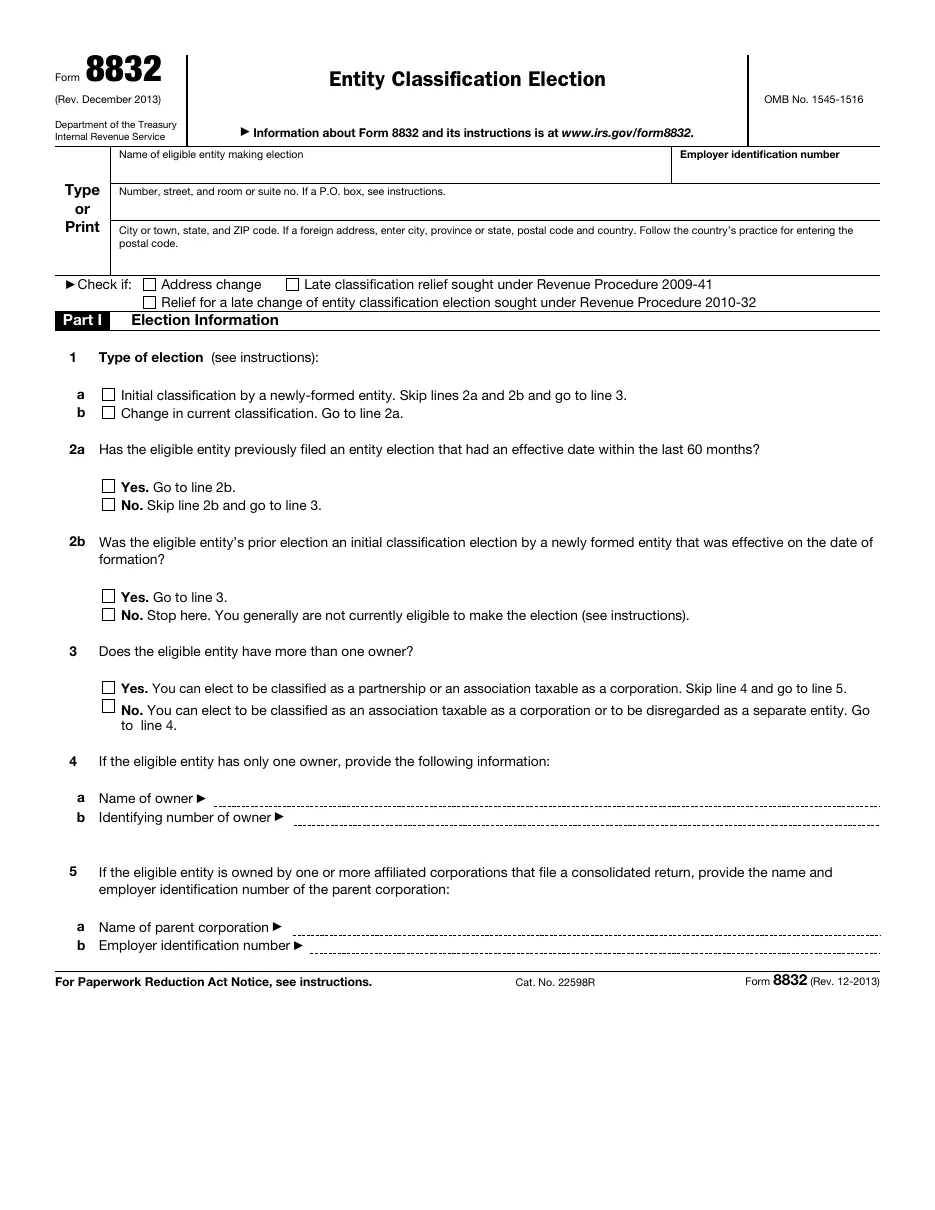
- HeaderEntity name, EIN and addressUse the entity’s own EIN. Check the boxes below the address only for an address change or a late election relief request.
- Line 1Type of election1a for a newly formed entity choosing its first classification, 1b to change its current one.
- Lines 2a-2b60-month ruleFor a change, say whether the entity made an election effective in the last 60 months. If so, you may not be eligible yet.
- Lines 3-5OwnersSay whether it has more than one owner. A single owner gives their name and SSN, ITIN or EIN on line 4. Line 5 is for entities owned by a consolidated group.
- Lines 6-8Classification and dateCheck one box from 6a to 6f, give the foreign country on line 7 if it was organized abroad, and the effective date on line 8.
- Lines 9-10Contact personName, title and phone number of the person the IRS can call.
- Consent statementSignaturesEach owner signs, or an officer, manager or member authorized to make the election. For a retroactive date, people who were owners during that period also sign.
Government fee
Free: the IRS charges no fee to file this form. Source: Form 8832 (Rev. December 2013) instructions, which list no fee.
The $4.90 forms. fee is separate. Government fees are always paid directly to the agency.
Where Form 8832 goes
Mail it to the IRS service center for your state listed in the current instructions. The IRS updated these addresses in a notice at the front of the PDF. Keep proof of mailing, such as a certified mail receipt.
Common mistakes to avoid
- Filing before the entity has an EIN, or writing “Applied For”. The election won’t be accepted.
- Choosing an effective date more than 75 days back. The election then defaults to 75 days before filing.
- Using Form 8832 to become an S corporation. That is Form 2553.
- Missing the signature of an owner who must consent.
- Forgetting to attach a copy to the entity’s tax return for the election year.
When the free official option is enough
The IRS publishes a free fillable PDF of Form 8832 on irs.gov. forms. is for when you'd rather answer questions in plain English and get a checked PDF.
Questions
- Do I need to file Form 8832 for my LLC?
- Only if you want a classification other than the default. By default, a U.S. LLC with one member is disregarded and one with two or more members is a partnership. A new LLC that keeps its default doesn’t file.
- Form 8832 or Form 2553: which do I need?
- Form 8832 elects corporation, partnership or disregarded entity treatment. To be an S corporation, file Form 2553. An eligible entity that timely files Form 2553 and qualifies is treated as having elected corporation status, so it doesn’t also file Form 8832.
- When does a Form 8832 election take effect?
- On the date you enter on line 8. It can’t be more than 75 days before the date you file or more than 12 months after. If you leave line 8 blank, it takes effect on the date you file.
- Can I change my classification again later?
- Generally not for 60 months after a change takes effect, unless the IRS allows it by private letter ruling. The limit doesn’t apply if the earlier election was made by a newly formed entity and took effect on its formation date.
- What if I missed the deadline?
- Part II lets an entity ask for late election relief under Rev. Proc. 2009-41 in some cases, generally within 3 years and 75 days of the requested effective date. This is technical, so consider talking to a tax professional.
- Is this the official form?
- Yes. We fill the Form 8832 published by the Internal Revenue Service, in its latest edition. You sign it and file it yourself.
- What does the $4.90 cover?
- Filling in the form and downloading the PDF. Government fees, if any, are paid separately to the agency.